Using X5 Auto control panel
The X5 Wire Feeder 300 Auto/Auto+ wire feeder and control panel include advanced features and functions for MIG welding with the option to use the X5 FastMig also for TIG (DC) and MMA welding and gouging.
The automatic 1-MIG process is available along with the Kemppi welding programs as well as Wise and MAX features and processes (optional). For more information, refer to How to get welding programs.
X5 Wire Feeder 300 Auto/Auto+ control panel (X5 FP 300)
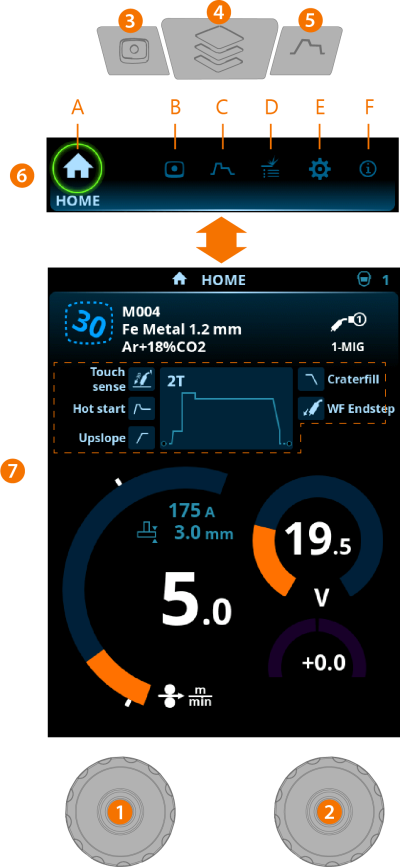
General
| 1. | Left control knob |
>> Adjustment and selection
| 2. | Right control knob |
>> Adjustment and selection
| 3. | Memory channels button |
>> Shortcut to the memory channel selection
>> Changed welding parameters can be quickly saved onto the active memory channel by keeping the Memory channels button pressed for approx. 2 seconds. This works in any view.
| 4. | View menu button |
>> Enter view selection
>> Long press of the button returns to Home view, or if already in Home view, to the last used view.
| 5. | Welding parameters button |
>> Shortcut to the welding parameters view
| 6. | View selection |
>> Change view by turning the control knob (2)
>> Confirm view change by pressing the control knob (2).
Views (7)
| A. | Home view |
| B. | Channels view |
| C. | Welding parameters view |
| D. | Weld history view |
| E. | Device settings view |
| F. | Info view. |

|
After each weld, a weld summary (Weld data) is displayed briefly. |

