Auto control panel: Home view
X5 Wire Feeder 300 Auto control panel's home view is also the main welding view.
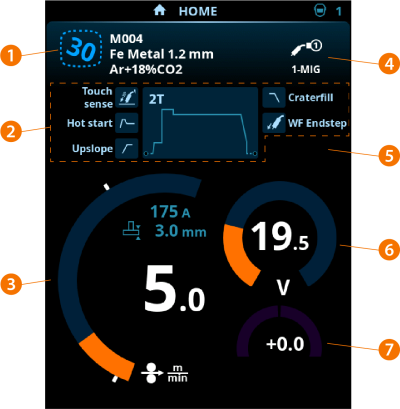
|
1.
|
Channel (and welding program if in use) |
|
2.
|
Applied welding parameters and functions |
|
5.
|
Applied device settings |
|
7.
|
Welding voltage fine tuning |
>> With Wise program features a corresponding Wise parameter adjustment is displayed.
Control knob functions in Home view
Left control knob:
|
•
|
In MIG mode: Wire feed speed adjustment |
|
•
|
In 1-MIG mode: Wire feed speed adjustment |
|
•
|
In TIG/MMA mode: Welding current adjustment |
|
•
|
In Gouging mode: Current adjustment. |
Right control knob:
|
•
|
In MIG mode: Welding voltage adjustment |
|
•
|
In 1-MIG mode: Fine tuning of welding voltage (the welding voltage is defined by the active welding program) |
|
•
|
In 1-MIG mode with Wise feature: Wise parameter adjustment (the welding voltage is defined by the active welding program) |
|
•
|
In MMA mode: Dynamics adjustment. |

