Installing add-on cards (optional)
Add-on cards are used for connecting an external device, such as a gun cleaning station, or a robot that does not have fieldbus connectivity, to the system.

|
The wiring of add-on cards is customer-specific, therefore this section gives only examples of the wiring. |
|
|
Add-on cards require a separate 24 V power supply that is not delivered with the AX MIG Welder equipment. |

|
Turn off the power source before installing add-on cards. |
For instructions on removing and attaching the RCM top cover, refer to Removing and attaching RCM top cover.
Tools needed

| 1. | Install the add-on card so that the groove on the card aligns with the tab on the add-on card slot. |
|
|
Keep the add-on card straight/horizontal when installing it. |
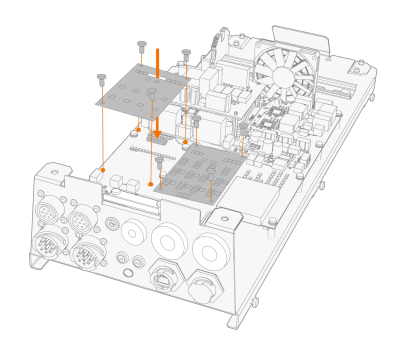
| 2. | Fix the add-on card to the main board with four screws (M2.5 x 12). |
| 3. | Route the cable through a cable inlet. (For information on cable inlets, refer to Routing cables into RCM.) |
