Trigger switch setting (GX series 5) – W015263 since 10/2020
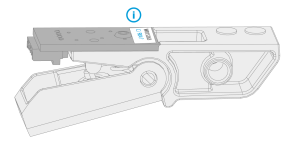
This instruction applies to series 5 trigger switch circuit boards W015263 with the version identification R04 (10/2020) or newer. Refer to the label on the circuit board for version information:

|
The series 5 Flexlite GX welding guns are designed and set up for Kemppi Fastmig, Pro and Kempact Pulse equipment by default (since trigger switch circuit board version R04 (10/2020)). The secondary trigger switch setting provides general support also for other than the above-mentioned Kemppi welding equipment. Use this option with caution. |
Settings diagram:
| Primary (default) | Secondary | ||
| ON | ON | ON | ON |

|

|
|
|
| 1 | 2 | 1 | 2 |
| - Kemppi Fastmig - Kempact Pulse - Kemppi Pro |
- Kempact Classic - Fitweld - X3 MIG Welder - Kempact RA - Other than Kemppi |
||
Tools needed:

TX6 |
For changing the setting:
| 1. | Detach the trigger switch. Refer to Trigger switch replacement for more detailed instructions. |
| 2. | Release the small screw holding the trigger switch circuit board and remove the circuit board. |
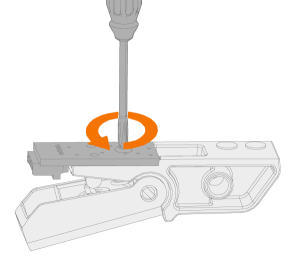
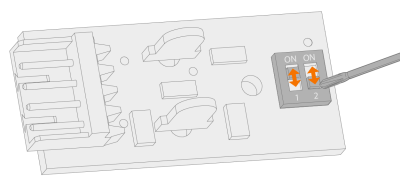
| 3. | Set the two dip switches on the circuit board to the correct position (refer to the settings diagram above). |
| 4. | Reassemble and reinstate the trigger switch. Refer to Trigger switch replacement for more detailed instructions. |
