Control Pad views: View menu
In the Welding view, press the Menu button again to see the list of the available additional views.
Figure: The list of the additional views:
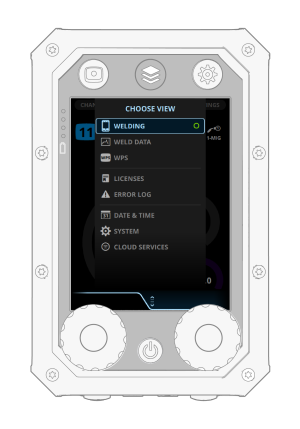
The View menu displays the following views:
| 1. | Welding |
>> Press to return to the Welding view.
| 2. | Weld data |
>> Displays information on the last welds.
| 3. | WPS |
>> For more information on WPSs, see Digital WPS.
| 4. | Licenses |
>> Displays the licenses installed into the welding system.
| 5. | Error log |
>> Displays the error occurred previously and its point of time. Select the error and press the green button to view the details.
| 6. | Date & time |
>> Set the date, time and the time zone.
| 7. | System |
>> Displays information on the welding system.
| 8. | Cloud services |
>> Connect to Kemppi cloud services.
