Auto control panel: Settings
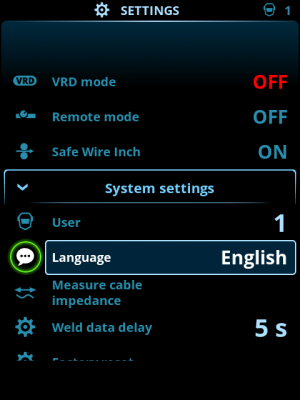
Changing settings
| 1. | Turn the right control knob to highlight the desired settings parameter. |
| 2. | Press the right control knob to select the settings parameter for adjustment. |
| 3. | Turn the right control knob to select the settings value. |
>> Depending on the settings parameter to be adjusted, refer also to the Settings table below for more details.
| 4. | Confirm the new value / selection and close the adjustment view by pressing the right control knob. |
Users
The system settings can be customized for up to 10 different users. In addition to the system settings, the memory channels are user-specific. Each user can have up to 100 MIG channels, 10 TIG channels, 10 MMA channels and 10 gouging channels. The memory channel and system settings are saved automatically for the logged-in user.
Settings
| Parameter | Parameter value | Description |
|---|---|---|
| User | Current user | There is always a logged-in user in the system. When a new user logs in, the previous user is automatically logged out. In case of a mixed double wire feeder installation (Manual+Auto), user 1 is automatically applied and user change is disabled. |
| Operation mode | MIG/TIG/MMA/Gouging | |
| Remote control | OFF/Remote/Gun Default = OFF |
If remote controller is not connected, this selection is not available. |
| Remote mode (with 1-knob remote control) |
Wire feed speed or Current / Channel | This determines what is changed with the remote, welding parameter or memory channel (available channels: 1...5). The adjusted parameters are process-specific. If remote controller is not connected and remote not selected, this selection is not available. Note (2-knob remote): When the remote mode is set to 'Channel', only the left remote control knob is in use. |
| Remote mode (with 2-knob remote control) |
Welding parameters / Channel | |
| Water cooler | OFF/Auto/ON Default = Auto |
When ON is selected, the coolant is circulated continually, and when Auto is selected, the coolant is circulated only during welding. |
| Wire retract | OFF/ON | This is an automatic wire retract feature. Once the arc is extinguished, the wire is retracted for additional safety. The user can change the wire retract delay and length settings. Note: Wire retract function is disabled if a subfeeder is connected. |
| - Retract delay | 2...10 s, step 1 Default = 5 s |
|
| - Retract length | 1...10 cm, step 1 Default = 2 cm |
|
| Subfeeder type (in MIG mode and with X5 Wire Feeder 300 only) |
Subfeeder model / OFF Default = OFF |
If a compatible subfeeder is connected, select the subfeeder from the list. Compatible subfeeders: SuperSnake GTX/GT02S (10m, 15m, 20m, 25m), Binzel PP401D, Binzel PP36D. Note: With SuperSnake GT02S models, only motor synchronization is supported. |
| Weld data duration | 0...30 s, step 1 0 = OFF Default = 5 s |
This defines if and how long the weld data summary is shown after each weld. |
| Weld data averages | Without slopes / Entire weld Default = Without slopes |
This feature allows the user to change how the weld data averages are calculated: with or without the slope phases in the beginning and in the end of the weld. This setting affects the calculation of the averages for the following: welding voltage (terminal and arc voltage), welding current, welding power and wire feed speed. |
| Date | Current date | |
| Time | Current time | |
| Language | Available languages | |
| Factory reset | Reset/Cancel Default = Cancel |
|
| Safe wire inch (with MIG only) |
OFF/ON | When ON, and the arc doesn't ignite, the filler wire is fed 5 cm When OFF, 5 m of filler wire is fed. |
| Cable calibration (with MIG only) |
Start/Cancel | The date and time and the calibration information of the previous calibration is also shown. Refer to Calibrating welding cable for cable calibration. |
| VRD (with MMA and gouging only) |
OFF/12V/24V Default = OFF |
Voltage reduction device (VRD) reduces the open-circuit voltage to maintain below a certain voltage value. |

