Settings

|
The contents of the Settings menu depend on the welding process, current mode and welding mode selected. |
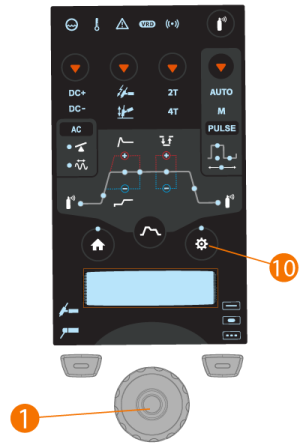
To select and adjust parameters in Settings menu:
| 1. | Press the parameter settings button (10) to enter the menu. |
| 2. | Browse through the menu parameters by turning the control knob (1). |
| 3. | Select a parameter for adjustment by pressing the control knob button (1). |
| 4. | Adjust the selected parameter by turning the control knob (1). |
| 5. | Close the parameter setting by pressing the control knob button (1). |
To enter advanced Settings menu:
Press the Settings button (10) for 5 seconds.
|
|
Rarely used settings items are hidden by default. Those are available in the advanced settings menu. |
Settings:
| Parameter | Parameter value | Description |
|---|---|---|
| Latest weld | Current, voltage, arc time | This settings item shows last weld data values. |
| AC electrode type | Default / Green | AC electrode type. If you are using the green AC electrode type, select Green. The default applies to all other AC electrode types. |
| AC Waveform | Sine / Optima / Square (Default: Optima) | Function to change the wave form of the alternating current in AC TIG welding. Three options are available: sine, square and Optima. The wave form affects the shape of weld bead, penetration of the weld and the noise of the welding process. Select the one that suits the application. |
| Spot time | 0.1 s ... 150.0 s, step 0.1 / 1.0 s (Default = 2.0 s) | Spot welding: TIG welding function, which automatically produces a weld of predefined duration. Parameters are preset by the user. This function is used for attaching two pieces of materials with tack welds, for example joining thin sheets with low heat input. |
| MIX TIG AC ratio | 10 % ... 90 %, step 1 % (Default = 50 %) | MIX TIG: TIG welding function, where AC TIG and DC TIG processes alternate in predefined manner. Parameters are preset by the user according to welding application. Used especially for optimizing welding of aluminum materials of dissimilar thicknesses. |
| MIX TIG cycle time | 0.1 s ... 1.0 s, step 0.1 s (Default = 0.6 s) | |
| MIX TIG DC level | 50 % ... 150 %, step 1 % (Default = 100 %) | |
| MicroTack spot time | 1 ms ... 200 ms, step 1 ms (Default = 10 ms) | MicroTack: TIG welding function, which optimizes the spot welding characteristics. Used for tack welding of thin sheets or materials of different thicknesses. Allows fast and easy creation of clean tack welds with minimum heat input. |
| MicroTack pause time | 50 ms ... 500 ms, step 1 ms (Default = 50 ms) | |
| MicroTack spot count | 1 ... 5, Endless (Default = 1) | |
| Arc force | -10 ... +10 , step 1 (Default = 0) | Adjusts short circuit dynamics (roughness) of MMA welding by changing, for example, current levels. |
| Hot start | -10 ... +10 , step 1 (Default = 0) | Welding function that uses higher welding current at the start of the weld. After the Hot start period the current drops to normal welding current level. The values for Hot start current level and its duration are preset manually. This facilitates the start of the weld especially with aluminum materials. |
| VRD | OFF / ON (Default = OFF) | VRD (Voltage Reduction Device): A safety device used in welding equipment to reduce the open-circuit voltage to maintain below a certain voltage value. This reduces the risk of electric shock particularly in dangerous environments, such as closed or damp spaces. VRD may also be required by law in certain countries or regions. In AU VRD version: Default ON, OFF disabled. |
| MMA Antifreeze | OFF / ON (Default = ON) | A function which automatically decreases the welding current significantly when electrode is touching the workpiece. Can be used for avoiding MMA electrode getting too hot when it’s in contact with the workpiece. |
| HF spark force | 50 % ... 110 %, Step 1 % (Default 100 %) | Adjusts the voltage of the high frequency spark used in ignition. |
| TIG antifreeze | OFF / ON (Default = OFF) | A function which automatically decreases the welding current significantly when electrode is touching the workpiece. Can be used for example to avoid unwanted dilution from electrode to welded metal. |
| Remote mode | OFF / Remote / Torch (Default = OFF) | |
| Remote control min | Min = “Current limit min”, Max = “Current limit max” | |
| Remote control max | Min = “Current limit min”, Max = “Current limit max” | |
| Wireless remote | Cancel / Start (Start pairing) | |
| Water cooler | OFF / Auto / ON (Default: Auto) | |
| Weld data time | OFF / 1 s ... 10 s, step 1 s (Default = 5 s) | This defines if and how long the weld data summary is shown after each weld. |
| Display off | 5 min ... 120 min, step 1 min (Default = 5 min) | |
| Date | Date setting (DD/MM/YYYY) | Set the day by pressing and turning the control knob. Once the day is set, press the control knob button to set the month etc. |
| Time | Time setting (HH:MM) | Set the hour by pressing and turning the control knob (use 24 h format). Once the hour is set, press the control knob button to set the minutes. |
| Language | Select language from the list. | |
| Time counter | Total arc time and power on time. | |
| Time counter (since date) | Total arc time and power on time since last reset. | |
| Reset counter | Time counter reset. | |
| 4T trigger logic | 4T MLOG / 4T LOG / 4T LOG+ (Default = 4T MLOG) | Trigger operation mode of a welding torch. When you press the trigger down in 4T mode, shielding gas starts to flow but the arc won’t ignite until you release the trigger. To stop welding you press the trigger down again and then release it to extinguish the arc. |
Advanced settings (hidden in standard view):
| Parameter | Value | Description |
|---|---|---|
| Current limit min | TIG: 2 A / MMA: 8 A, step 1 A * | |
| Current limit max | TIG: power source's nominal value / MMA: power source's max. MMA current, step 1 A * | |
| Balance min | -99 % ... 0 % (Default = -60 %) | Sets the minimum value for AC balance setting. |
| Balance max | 0 % ... 20 % (Default = 0 %) | Sets the maximum value for AC balance setting. |
| Lift TIG current | 5 A ... 40 A / Auto (Default = Auto) | Contact current in the beginning of Lift TIG ignition. |
| Cooler flow watch | OFF / ON (Default = ON) | |
| Positive ignition current | 30 % ... 150 % / Auto, step 1 % (Default = Auto) | Adjusts the current level of the positive ignition sequence. Only in ACDC power sources (TIG). This parameter is adjusted separately for AC and DC current modes. |
| Negative ignition current | 100 % ... 300 % / Auto, Step 1 % (Default = Auto) | Adjusts the current level of the negative ignition sequence. Only in ACDC power sources (TIG). This parameter is adjusted separately for AC and DC current modes. |
| Ignition current | 30 % ... 150 % / Auto, step 1 % (Default = Auto) | Adjusts the current level of the negative ignition sequence. Only in DC power sources (TIG). |
| Positive ignition time | 0 ms ... 200 ms / Auto, step 10 ms (Default = Auto) | Adjusts the length of the positive ignition sequence. Only in ACDC power sources (TIG). This parameter is adjusted separately for AC and DC current modes. |
| Negative ignition time | 0 ms ... 950 ms / Auto, step 10 ms (Default = Auto) | Adjusts the length of the negative ignition sequence. Only in ACDC power sources (TIG). This parameter is adjusted separately for AC and DC current modes. |
| Ignition time | 0 ms ... 950 ms / Auto, step 10 ms (Default = Auto) | Adjusts the length of the negative ignition sequence. Only in DC power sources (TIG). |
| Slight upslope | OFF / ON (Default = OFF) | This is a function that automatically creates a slight upslope to prevent electrode wearing caused by sudden current rises with high welding currents. This function has an effect only when the welding current is 100 A or more. |
| Startup level | 5 % ... 40 %, step 1 % (Default = 25 %) | The point of welding current where the upslope begins. |
| Downslope cut level | 5 % ... 40 %, step 1 % (Default = 10 %) | The point of welding current where the downslope ends. |
| 2T downslope cut | OFF / ON (Default = OFF) | This is a function that allows the user to end the current downslope ramp with a quick press of the torch switch. |
| Nonlinear downslope | 0 % ... 50 %, step 1 % (Default = 0 %) | Determines a point to which current goes down as fast as possible and then starts normal downslope. |
| Current freezing | OFF / ON (Default = OFF) | Welding current can be freezed to a certain level during downslope by pressing the trigger. |
| AC phase swap current | 5 A ... 20 A / Auto | Changes the welding current point where crossing the zero begins. Affects only AC TIG. |
| Info | Machine type, serial number. | |
| Software version | Power source and control panel software version number. | |
| Factory reset | Cancel / Reset (Default = Cancel) | Resets to TIG, DC-, 50 A, HF, Pulse OFF (other values as per default). Once the factory reset is complete, the power source must be restarted manually. |
* Current range adjustable by welder in TIG welding:
| • | 2 A ... 130 A, 1 A step (MasterTig 235, limited supply mode) |
| • | 2 A ... 235 A, 1 A step (MasterTig 235) |
| • | 2 A ... 305 A, 1 A step (MasterTig 325, 335) |
| • | 2 A ... 405 A, 1 A step (MasterTig 425) |
| • | Default = 3 A ... Nominal value of the power source. |
* Current range adjustable by welder in MMA welding:
| • | 8 A ... 85 A, 1 A step (MasterTig 235, limited supply mode) |
| • | 8 A ... 185 A, 1 A step (MasterTig 235) |
| • | 8 A ... 255 A, 1 A step (MasterTig 325, 335) |
| • | 8 A ... 355 A, 1 A step (MasterTig 425) |
| • | Default = 10 A ... MMA maximum current of the power source. |
