USB backup and restore
The USB backup feature allows the current welding parameters, memory channels and other settings to be backed up on a USB memory stick.
|
1.
|
Turn the welding machine on. |
|
2.
|
If creating a backup, go to the device settings and select Backup. |
|
3.
|
If restoring from a backup, go to the device settings and select Restore. |
|
4.
|
Open the USB connector cover and connect the USB memory stick to the Master M 358 control panel. |
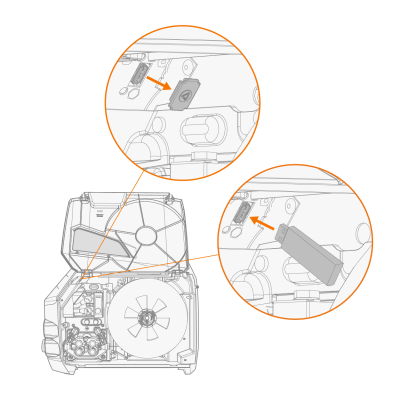
|
5.
|
Follow the steps on the control panel screen to complete the backup/restore operation. |
