Connecting to welding equipment
The Kemppi GX-ROBOT System equipment is directly compatible with the AX MIG Welder equipment's wire feeder model R500 Wire Feeder HD EUR+. The R500 Wire Feeder EUR and EUR+ models require the GX-R 10 pin cable adapter.

|
For connecting to the welding equipment, refer also to your welding equipment’s instructions. |
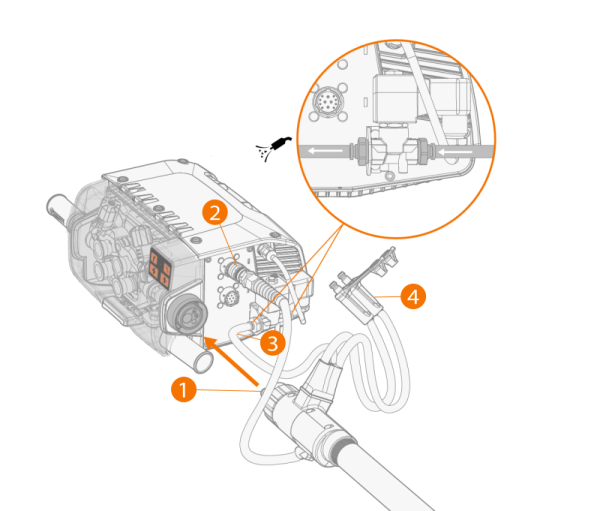
Connecting to R500 Wire Feeder HD EUR+:
|
1.
|
Push the welding cable connector (1) to the Euro connector and hand-tighten the collar. |
|
2.
|
Connect the welding torch control cable (2) to the wire feeder's control cable connector. |
|
3.
|
To use welding torch cleaning with compressed air, connect the compressed air hose of the welding cable (3) to the outlet connector of the air blow valve. |
|
4.
|
If you have the optional cooling unit, connect the cooling liquid hoses (4). |
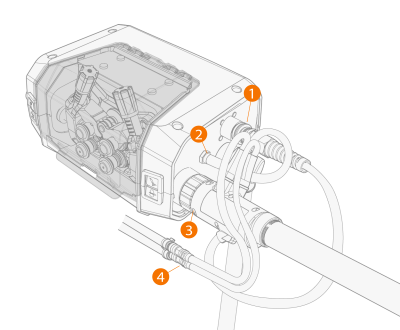
Connecting to R500 Wire Feeder EUR/EUR+:
|
1.
|
Connect the GX-R 10 pin cable adapter (1) to the peripheral connector. |
|
2.
|
R500 Wire Feeder EUR+: To use welding torch cleaning with compressed air, connect the compressed air hose (2) to the outlet connector. |
|
3.
|
Push the welding cable connector (3) to the Euro connector and hand-tighten the collar. |
|
4.
|
If you have the optional cooling unit, connect the cooling liquid hoses (4). |