Replacing collision sensor springs
The collision sensor has four spring stiffness options. Replace the springs if different stiffness is required.
| Spring stiffness | Color marking | X-R Sensor T1 | X-R Sensor T2 |
|---|---|---|---|
| Light | Green | ○ | ○ |
| Medium | Blue | ● | ○ |
| Strong | Red | ○ | ● |
| Extra strong | Yellow | ○ | ○ |
● = The spring type pre-installed when delivered.
○ = Available.
Tools needed:


This replacement method applies to both X-R Sensor T1 and X-R Sensor T2, but the visual details may vary.
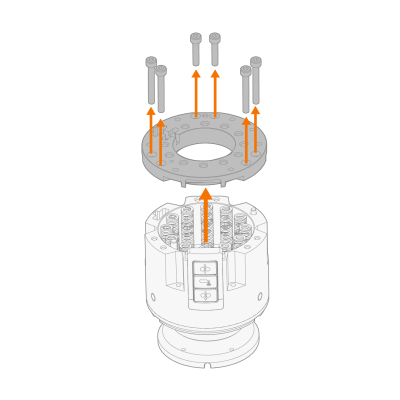
| 1. | Remove the mounting plate fixing screws, mounting plate and springs. |
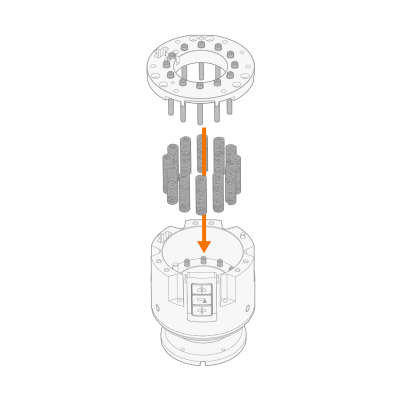
| 2. | Install the new springs so that they align with the pins in the sensor. |

|
Use suitable bolts to help align the springs. |
| 3. | Reattach the collision sensor's mounting plate and secure it with the fixing screws. |
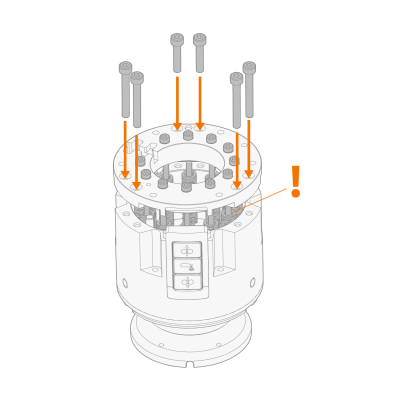
| 4. | Remove the bolts you used to help align the springs. |