Using torch remote GRe80 (series 8)

|
The series 8 Flexlite GXe welding torches can be used with X5 FastMig and Master M (350 models) welding equipment only. |
With the GRe80 welding torch remote control, you can select memory channels and adjust wire feed speed, welding current, welding voltage or voltage fine tuning depending on the welding process used.
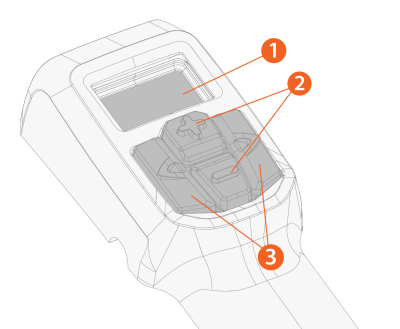
>> Displays the adjusted parameter and notifies if there is an error ("Err") in the welding system.
|
2.
|
Plus/minus (+/-) buttons |
>> Changes the parameter value.
|
3.
|
Left/right arrow buttons |
>> Changes between adjustable parameters/views.
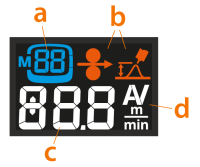
Remote control display items
|
a.
|
Memory channel symbol and selected memory channel |
|
b.
|
Wire feed speed and fine tuning symbols |
|
c.
|
Adjusted parameter value (or error indicator) |
|
d.
|
Adjusted parameter unit |
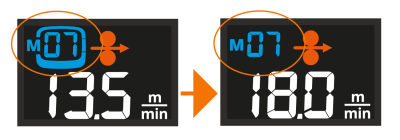
When the parameter is adjusted with the remote and the parameter value doesn't reflect the one saved on the selected memory channel anymore, this is indicated on the display by showing only the memory channel number without the channel box around it:
Remote control views and operation
|
•
|
Memory channel view: The memory channel is changed by pressing the +/- buttons. Long press of a +/- button scrolls the parameter values faster. Long press of the left arrow button saves the adjusted parameters on the currently selected channel. |
|
•
|
Welding power view: Depending on the used welding process, wire feed speed or current is adjusted by pressing the +/- buttons. Long press of a +/- button scrolls the parameter values faster. |
|
•
|
Fine tuning view: Depending on the welding process used, voltage or welding process specific parameter is fine-tuned by pressing the +/- buttons. Long press of the +/- button scrolls the parameter values faster. Long press of the right arrow button switches between different parameter sets, as applicable. |