Using gun remote GXR80 (series 8)

|
The series 8 Flexlite GX welding gun and digital gun remote can be used with Kemppi X8 MIG Welder only. |
With the series 8 Flexlite GX remote control, you can select memory channels and WPSs (Welding Procedure Specifications), and adjust wire feed speed, fine tuning and dynamics.
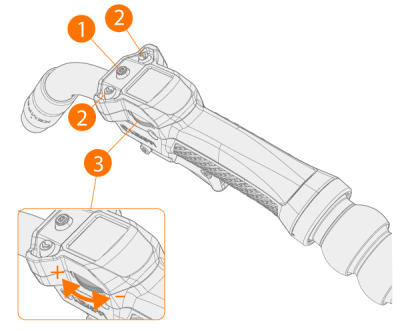
| 1. | Channel button |
| 2. | Arrow buttons |
| 3. | Roller switch |
The remote control has two views: Channel view and Settings view. Press the Channel button (1) to switch between the views.
Selecting memory channel or WPS
In the Channel view, use the arrow buttons (2) to change the channels. There are two kinds of channels:
| • | Memory channels. The view shows the number of the memory channel, the name of the welding program, and the process symbol. |
| • | WPS channels. The view shows the WPS name and the pass name. If the WPS covers several passes, use the arrow buttons (2) to move between the passes. |
Adjusting welding parameters
In the Settings view, you can view and adjust e.g. wire feed speed. Use the arrow buttons (2) to move between the parameters. Use the roller switch (3) to adjust the parameter value.
You can save the changes in the channel by pressing and holding the channel button (1) for more than 3 seconds.
|
|
The remote control is disabled if MMA or gouging mode is used. |
| Gun remote warning and error icons | |
|---|---|

|
System warning. The warning concerns an error in the system, for example, low liquid level. The symbol first blinks for 10 seconds, then stays solid. Welding is enabled even though the symbol is displayed. |

|
WPS warning. One of the most essential welding parameters has been adjusted beyond the limits of the WPS in use. The parameter in question is displayed in red. Welding is enabled even though the symbol is displayed. |

|
System error. Welding is disabled. |
