DCM settings
This section describes how to configure the DCM settings with the Kemppi Cobotics application.
| 1. | Select the parameter for adjusting. |
>> Depending on the parameter to be adjusted, refer also to the Settings parameters table below for more details.
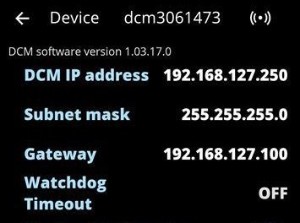
| 2. | Enable the Modbus TCP interface by setting the 'Modbus TCP interface' to ON. |
Tip: You can go back to the list of devices by clicking the device information bar at the top of the device view. |
DCM settings
| Parameter | Value | Description |
|---|---|---|
| Modbus TCP interface | ON/OFF | Enables or disables the Modbus TCP fieldbus interface used for the communication between the welding equipment and the robot. |
| DCM IP address | E.g. 192.168.127.250 |
IP address of the DCM. Note that the DCM IP address used by the fieldbus converter is 192.168.127.250 (refer to Connecting fieldbus converter (optional)). |
| Subnet mask | 0.0.0.0 ... 255.255.255.255 Default = 255.255.255.0 |
DCM subnet mask. |
| Gateway | E.g. 192.168.127.1 | IPv4 address of the gateway (if used). |
| Watchdog timeout | 0 ... 65535 ms Default = 0 (OFF) |
When the watchdog timeout is set, the robot must toggle the watchdog control bit between states 1 and 0 continuously when the robot control mode is enabled. If the robot stops toggling, a watchdog timeout occurs, and the welding system stops and gives a watchdog error. |